Adding My posts sub menu for posts section in wordpress

Let me explain the situation. Suppose you have contributor access to wordpress. If you go to posts page in admin panel that list all posts   and here you are not author of all posts.  you will see the url like
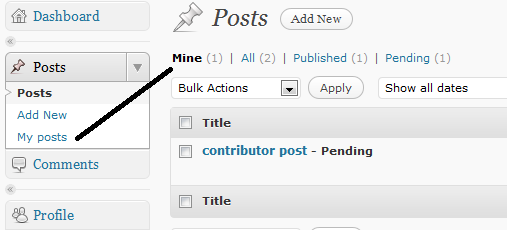
[code language=”php”]edit.php?post_type=post&all_posts=1[/code] and All( total post number here). There will be another menu named Mine(Current user post number). All link is default. So we can make nother submenu of posts in admin section for Mine link directly. Let me show you the few lines code.
[code language=”php”]add_action(‘admin_menu’, ‘manchu_myposts’);
function manchu_myposts()
{
if (function_exists(‘add_submenu_page’))
{
//$parent, $page_title, $menu_title, $access_level, $file, $function = ”
add_submenu_page(‘edit.php’,’My Posts’,’My posts’, 1, ‘edit.php?post_type=post&author=’.get_current_user_id());
}
}[/code]
You can copy-paste above code in your theme functions.php file and it will show a new sub menu in posts ectin as My posts. Multi user blog users can get easily link for his/her posts.
myposts
it’s just a easy way to make personal posts link for any user have access at leas contributor. Access level 1 belongs to contributor..

Update: 15-09-2011

While working on a project I got a tips from stackoverflow wordpress site about showing only specific author’s posts in author mode.
[code language=”php”]
function cb_posts_for_current_author($query) {
global $pagenow;

if( ‘edit.php’ != $pagenow || !$query->is_admin )
return $query;

if( !current_user_can( ‘manage_options’ ) ) {
global $user_ID;
$query->set(‘author’, $user_ID );
}
return $query;
}
add_filter(‘pre_get_posts’, ‘cb_posts_for_current_author’);
[/code]

thank you

Stuck in wordpress Maintenance Mode?

Are you Stuck in wordpress Maintenance Mode?  I was in that situation and thought to write about my pain and findings so that it may be help to reduce pain in the ass when u are crazy to do some upgrade for plugins and themes and you are stuck  in maintenance mode for “something wrong” in upgrade/upadte process .

This tip is for wordpress3.0+, don’t  know what to do for lower version.  The thing is when wordpress takes the site maintenace mode it creates a file in the site root dir named .maintenance  and when done remove that… 🙂

So, now you know what to do if u are stuck in maintenance mode. I wish I am going to sleep well tonight.

note: check the dicussion in wordpress forum about this issue.

btw, let me show you a sample screenshot about how the error msg look for upgrade failure

failure

Facebook fanbox wordpress plugin

It’s just a simple fanbox widget as wordpress plugin, nothing to explain. But I made my own version ?

Features

  • iframe method
  • auto detect ie(internet explorer), because sometimes it’s make problem for ie and option to use as iframe only for ie !
  • jquery based document ready facebook load ! Not clear ? see bellow

One thing to note that I used a way to load the facebook js script after loading jquery as normally in wordpress site front end we use jquery and many plugin uses this… so we can take that jquery is using default. So I loaded the fb js using wp_enqueue function and then called the fb init function after the document is loaded using jquery dom ready function 😛 … It’s just an experiment about slow loading of facebook fanbox widget in wordpress 😀

Download

[download id=”23″]

If you just download with no comment and no recommendation to others, then I am planning to hate you 😛
Man at least share in social network and give me traffic so that I can have more money from ads 🙁

Good morning. It’s just morning after working whole night and I am feeling too hungry 🙂
Continue reading

āϜ⧁āĻŽāϞāĻžāϤ⧇ āύ⧇āϟāĻŋāĻ­ āϟ⧁āϞāϟāĻŋāĻĒ āĻāϰ āĻŦā§āϝāĻŦāĻšāĻžāϰ

Hei! it’s bengali unicode text, This post is wrriten for amaderprojukti forum.
āĻ…āύ⧇āĻ• āĻĻāĻŋāύ āĻŦāĻžāĻ‚āϞāĻžāϝāĻŧ āĻŦā§āϞāĻ— āĻŦāĻž āϟāĻŋāĻĒā§āϏ āĻ•āĻŋāϛ⧁ āϞ⧇āĻ–āĻž āĻšāϝāĻŧ āύāĻžāĨ¤ āφāϜāϕ⧇āϰ āĻŦāĻŋāώāϝāĻŧ āφāĻŽāĻžāϰ āĻ…āύ⧇āĻ• āϗ⧁āϞ⧋ āĻ—āĻžāĻ°ā§āϞāĻĢā§āϰ⧇āĻ¨ā§āĻĄ āĻāϰ āϭ⧇āϤāϰ āĻ…āĻ¨ā§āϝāϤāĻŽ “āϜ⧁āĻŽāϞāĻž”āĨ¤ āϝāĻĻāĻŋāĻ“ āφāϜāϕ⧇āϰ āϞ⧇āĻ–āĻžāϟāĻž āϜ⧁āĻŽāϞāĻžāϰ āĻāĻ•āϟāĻŋ āĻ—ā§‹āĻĒāύ āϏ⧁āĻ¨ā§āĻĻāϰ āĻĻāĻŋāĻ• āύāĻŋāϝāĻŧ⧇ āφāϰ āϤāĻž āĻšāϞ⧋ āϜ⧁āĻŽāϞāĻž ā§§.ā§Ģ āĻāϰ āύ⧇āϟāĻŋāĻ­ āϟ⧁āϞāϟāĻŋāĻĒāĨ¤
āĻĒā§āϰāĻĨāĻŽ āĻāĻ•āϟāĻŋ āĻ›āĻŦāĻŋ āĻĻ⧇āĻ–āĻžāϝāĻŧāσ
tooltip
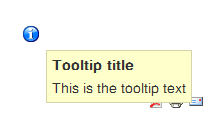
āĻāĻĄāĻŽāĻŋāύ āĻĒā§āϝāĻžāύ⧇āϞ⧇ āϕ⧋āύ āĻ•āĻŋāϛ⧁ āĻ•āύāĻĢāĻŋāĻ—āĻžāϰ⧇āĻļāύ⧇ āĻĸ⧁āĻ•āϞ⧇ āĻŦāĻž āĻ…āύ⧇āĻ• āϏāĻŽāϝāĻŧ āϕ⧋āύ āϞāĻŋāĻ™ā§āĻ•āĻ āĻŽāĻžāωāϏ āĻšā§‹āĻ­āĻžāϰ āĻ•āϰāϞ⧇ āωāĻĒāϰ⧇āϰ āĻŽāϤ⧋ āϟ⧁āϞāϟāĻŋāĻĒ āĻĻ⧇āĻ–āĻžāϝāĻŧāĨ¤ āĻāĻ•āχ āϰāĻ•āĻŽ āϟ⧁āĻĒāϟāĻŋāĻĒ āϚāĻžāχāϞ⧇ āφāĻŽāϰāĻž āĻĢā§āϰāĻ¨ā§āϟ āĻāĻ¨ā§āĻĄ āĻ āĻŦā§āϝāĻŦāĻšāĻžāϰ āĻ•āϰāϤ⧇ āĻĒāĻžāϰāĻŋ āφāϰ āϤāĻžāϰ āϜāĻ¨ā§āϝ āĻāĻ•ā§āϟāĻŋāĻ­ āĻŸā§‡āĻŽāĻĒā§āϞ⧇āĻŸā§‡ āĻĻāϰāĻ•āĻžāϰ āϏāĻžāĻŽāĻžāĻ¨ā§āϝ āĻĒāϰāĻŋāĻŦāĻ°ā§āϤāύ, āϏ⧇āχ āĻĒāϰāĻŋāĻŦāĻ°ā§āϤāύ āĻ•āĻŋāĻ­āĻžāĻŦ⧇ āĻ•āϰāĻž āϝāĻžāϝāĻŧ āϤāĻž āύāĻŋāϝāĻŧ⧇āχ āφāϜāϕ⧇āϰ āφāϞ⧋āϚāύāĻžāĨ¤ āĻĒāϰ⧇āϰ āĻ›āĻŦāĻŋāϟāĻŋ āĻĢā§āϰāĻ¨ā§āϟ āĻāĻ¨ā§āĻĄ āĻāϰāĨ¤
tootip

āĻ•āĻŋāĻ­āĻžāĻŦ⧇ āĻĢā§āϰāĻ¨ā§āϟ āĻāĻ¨ā§āĻĄā§‡ āϟ⧁āϞāϟāĻŋāĻĒ āĻĢāĻŋāϚāĻžāϰ āϝ⧁āĻ•ā§āϤ āĻ•āϰāĻŦ⧇āύāσ
āϟ⧁āϞāϟāĻŋāĻĒ āĻĢāĻŋāϚāĻžāϰ āϝ⧁āĻ•ā§āϤ āĻ•āϰāĻžāϰ āϜāĻ¨ā§āϝ āφāĻĒāύāĻžāϕ⧇ āĻĒā§āϰāĻĨāĻŽ āĻŸā§‡āĻŽāĻĒā§āϞ⧇āĻŸā§‡āϰ āχāĻ¨ā§āĻĄā§‡āĻ•ā§āϏ āĻĢāĻžāχāϞ(index.php) āĻ āĻāĻ•āϟāĻŋ āϞāĻžāχāύ āϝ⧁āĻ•ā§āϤ āĻ•āϰāϤ⧇ āĻšāĻŦ⧇āĨ¤ āϝāĻĻāĻŋ āφāĻĒāύāĻŋ āĻĄāĻŋāĻĢāĻ˛ā§āϟ āĻŸā§‡āĻŽāĻĒā§āϞ⧇āϟ āĻŦā§āϝāĻŦāĻšāĻžāϰ āĻ•āϰ⧇āύ āϤāĻžāĻšāϞ⧇ rhuk_milkyway āĻšāĻšā§āϛ⧇ āφāĻĒāύāĻžāϰ āĻŸā§‡āĻŽāĻĒā§āϞ⧇āϟ āĻāϰ āύāĻžāĻŽ, āĻāϰ āϭ⧇āϤāϰ index.php āĻĢāĻžāχāϞāϟāĻŋ āĻ“āĻĒ⧇āύ āĻ•āϰ⧁āύ āϕ⧋āύ āĻāĻĄāĻŋāϟāϰ⧇, āĻāĻ–āύ āĻšā§‡āĻĄ āĻŸā§āϝāĻžāĻ—() āĻāϰ āφāϗ⧇

Continue reading

āĻĻ⧇āĻ“ā§ŸāĻžāϞ

āĻāĻ•āϟāĻž āωāϚ⧁ āĻĻ⧇āĻ“ā§ŸāĻžāϞ⧇āϰ āϏāĻžāĻŽāύ⧇ āĻĒā§āϰāϤāĻŋāĻĻāĻŋāύāχ āĻĻāĻžāρ⧜āĻžā§Ÿ āφāϰ
āĻ­āĻžāĻŦāĻŋ āĻāχ āĻĻ⧇āĻ“ā§ŸāĻžāϞāϟāĻžāϰ āϤ⧈āϰāĻŋ āύāĻž āĻšāϞ⧇ āĻ•āĻŋ āϖ⧁āĻŦ āĻ•ā§āώāϤāĻŋ āĻšāϤ⧋ ?

āĻŽāĻžāĻā§‡ āĻŽāĻžāĻā§‡ āĻ­āĻžāĻŦāĻŋ āĻĻ⧇āĻ“ā§ŸāĻžāϞāϟāĻŋ āϜāĻŦāϰāĻĻāĻ¸ā§āϤāĻŋ āĻ•āϰ⧇ āϭ⧇āĻ™ā§āϗ⧇ āĻĢ⧇āϞāĻŋ āĻ•āĻŋāĻ‚āĻŦāĻž
āĻāϤ⧋ āĻĻā§‚āϰ⧇ āĻĒāĻžāϞāĻŋā§Ÿā§‡ āϝāĻžā§Ÿ āϝ⧇āĻ–āĻžāύ āĻĨ⧇āϕ⧇ āφāĻŽāĻŋ āϚāĻžāχāϞ⧇āĻ“ āĻāχ āĻĻ⧇āĻ“ā§ŸāĻžāϞ⧇āϰ āĻ•āĻžāϛ⧇ āφāϏāϤ⧇ āĻĒāĻžāϰāĻŦā§‹ āύāĻž … āĻšā§‡ āĻšā§‡

āϧāϰ⧇ āύāĻŋāϞāĻžāĻŽ, āφāĻŽāĻŋ āĻĻ⧇āĻ“ā§ŸāĻžāϞ āϭ⧇āĻ™ā§āϗ⧇ āĻĢ⧇āϞ⧇āĻ›āĻŋ āĻ•āĻŋāĻ¨ā§āϤ⧁
āĻāχāϝ⧇ āĻāϤ⧋ āĻŦāĻ›āϰ āϧāϰ⧇ āĻŽāύ⧇āϰ āϭ⧇āϤāϰ āφāϰ āĻāĻ• āĻŦāĻŋāĻļāĻžāϞ āĻĻ⧇āĻ“ā§ŸāĻžāϞ āϤ⧈āϰāĻŋ āĻšā§Ÿā§‡āĻ›āĻŋ āϏ⧇āϟāĻžāϰ āĻ•āĻŋ āĻšāĻŦ⧇ ?

āĻ­āĻžāĻŦāϛ⧋ āφāĻŽāĻŋ āύāĻŋāϰāĻžāĻļāĻžāĻŦāĻžāĻĻā§€ … āĻšā§‡ āĻšā§‡ āύāĻž āĻ āĻŋāĻ• āϤ⧇āĻŽāύāϟāĻŋ āύ⧟, āφāĻŽāĻŋ āϜāĻžāύāĻŋ āφāĻŽāĻŋ āĻāĻ•āĻĻāĻŋāύ āĻāχ āĻŽāύ⧇āϰ āĻĻ⧇āĻ“ā§ŸāĻžāϞāĻ“ āϭ⧇āϙ⧇ āĻĢ⧇āϞāĻŦā§‹, āϤāĻžāϰāĻĒāϰ ?
āĻĻ⧇āĻ“ā§ŸāĻžāϞ⧇āϰ āĻ“āĻĒāĻžāĻļ⧇ āϝāĻž āφāĻļāĻž āĻ•āϰ⧇āĻ›āĻŋāϞāĻžāĻŽ āϤāĻž āĻĨāĻžāĻ•āĻŦ⧇āϤ⧋, āύāĻžāĻ•āĻŋ āϏāĻŦāχ āĻĢāĻžāρāĻ•āĻŋāĨ¤āĨ¤

āĻ­āĻžāĻŦāĻ›āĻŋ āĻĻ⧇āĻ“ā§ŸāĻžāϞ⧇āϰ āĻĒā§āϰāϤāĻŋāĻĒāĻžāϞāĻ•āϕ⧇ āϧāĻŽāĻ• āĻĻāĻŋā§Ÿā§‡ āĻŦāϞāĻŋ,
āĻĢāĻžāϜāϞāĻžāĻŽāĻŋ āĻĒāĻžāχāϛ⧋, āχāĻšā§āĻ›āĻž āĻšāχāϞ⧋ āφāϰ āĻĻ⧇āĻ“ā§ŸāĻžāϞ āϤ⧁āϞ⧇ āĻŽāϜāĻž āĻĻ⧇āĻ–ā§‹ āύāĻž ?
———————————————————————————-
⧍ā§Ģ.ā§Ļā§Ē.⧍ā§Ļā§§ā§Ļ
āĻ‰ā§ŽāϏāĻ°ā§āĻ—āσ āĻāĻ•āϟāĻŋ āĻ…āĻĻ⧃āĻļā§āϝ āĻĻ⧇āĻ“ā§ŸāĻžāϞ āĻāĻŦāĻ‚ āϤāĻžāϰ āĻĒā§āϰāϤāĻŋāĻĒāĻžāϞāĻ•āϕ⧇

āĻāĻŦāĻ‚ āφāĻŽāĻŋ

āĻŽāύ⧇āϰ āϭ⧇āϤāϰ āϏāĻŦ āϏāĻŽā§Ÿ āĻāĻ•āϟāĻž āĻ…āĻ¸ā§āĻĨāĻŋāϰāϤāĻž āĻ…āύ⧁āĻ­āĻŦ āĻ•āϰāĻŋ
āĻĻāĻŋāύ⧇ āĻĻāĻŋāύ⧇ āĻāχ āĻ…āĻ¸ā§āĻĨāĻŋāϰāϤāĻž āĻ—āϤāĻŋāĻļā§€āϞ-āĻ¸ā§āĻĨāĻŋāϰ āϰ⧂āĻĒ āύāĻŋā§Ÿā§‡āϛ⧇āĨ¤
āĻāĻ•āϟāĻž āĻĒā§āϰāϚāĻ¨ā§āĻĄ āĻ­āĻŦāϘ⧁āϰ⧇ āĻā§œ āϏāĻŦ āϏāĻŽā§Ÿ āϤāĻžā§œāĻž āĻ•āϰ⧇,
āĻāχ āĻ…āĻ¸ā§āĻĨāĻŋāϰāϤāĻžāχ āφāĻŽāĻžāϰ āϚāϞāĻžāϰ āĻļāĻ•ā§āϤāĻŋ, āφāĻŽāĻžāϰ āĻ…āύ⧁āĻĒā§āϰāϰāĻŖāĻžāĨ¤

āĻĒāĻĨāϕ⧇ āĻ•āĻ–āύ⧋ āϭ⧁āϞāĻŋāύāĻŋ, āĻĒāĻĨāχ āϭ⧁āϞ⧇ āϗ⧇āϛ⧇ āφāĻŽāĻžāϕ⧇ āĻŦāĻžāϰ⧇ āĻŦāĻžāϰ,
āφāϰ āĻāχ āĻĒāĻĨ⧇āϰ āϟāĻžāύ⧇āχ āϝāϤ āĻ…āĻ¸ā§āĻĨāĻŋāϰāϤāĻž, āĻ­āĻŦāϘ⧁āϰ⧇ āύ⧇āĻļāĻžāĨ¤

āĻ•āĻ–āύ⧋ āĻ¸ā§āĻĨāĻŋāϰ āĻšāϤ⧇ āϚāĻžāχ āύāĻž, āϤāĻžāĻšāϞ⧇ āφāĻŽāĻžāϰ āĻĒāĻĨāĻž āϚāϞāĻž āĻĨ⧇āĻŽā§‡ āϝāĻžāĻŦ⧇!

ā§§ā§ŠāĨ¤ā§Ļā§ĒāĨ¤ā§¨ā§Ļā§§ā§Ļ
āϏāĻŦāĻžāχāϕ⧇ āφāĻ—āĻžāĻŽ āĻļ⧁āĻ­ āĻŦāĻžāĻ‚āϞāĻž āύāĻŦāĻŦāĻ°ā§āώ ā§§ā§Ēā§§ā§­
āĻ‰ā§ŽāϏāĻ°ā§āĻ—āσ āϤ⧋āϕ⧇

Using wordpress native thickbox

To know about what is thickbox please check this link. WordPress use this a main popup window or modal view. Thickbox is a jquery plugin and it’s available with wordpress with jquery. So my tips is how to use that in front end , using the thickbox available with it, no need to use externally.

ThickBox is a webpage UI dialog widget written in JavaScript on top of the jQuery library. Its function is to show a single image, multiple images, inline content, iframed content, or content served through AJAX in a hybrid modal.

At first let me tell you where you can get it if u search wordpress directory manually. Just check in wp-includes\js where you will get all the js library and plugins used with wordpress or available for use with plugin and theme. And here is every thing you need for thickbox
wp-includes\js\thickbox
Continue reading

WP Plugin: webmasterkey

Webmasterkey is a wordpress plugin to add google, yahoo, bing, alexa site verification meta tag from admin. I think it will be handy for webmaster.
Quick links for Google,Yahoo and Bing,Alexa webmaster tool

how to collect meta tags

I know max ppl are smart enough and can do it easily but some ppl are not mcuh technical and don no how to upload file or add meta tag in theme file and where. so, to get google meta tag key go to Google Webmaster, login using your google id and your site. See image bellow and check you will see something like this. Copy meta value (red underline in screenshot)
Continue reading